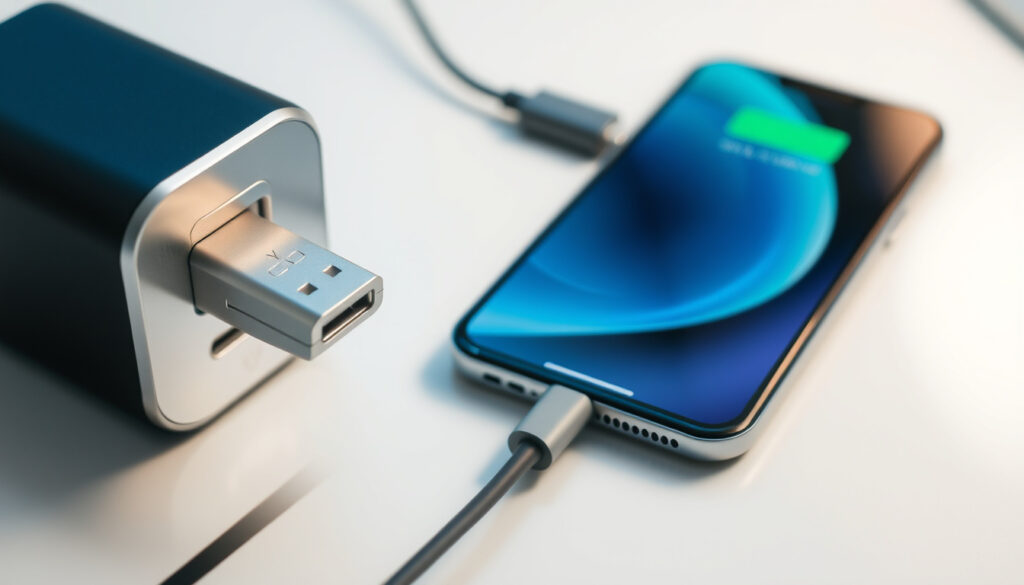
USB-C to USB Adapter: Compatibility, Charging, and Complete Guide
Plugging a new USB-C gadget into an older USB-A port shouldn’t be complicated, but the adapter sitting between them often decides whether it works, charges, or just sits there. Apple’s own USB-C to USB Adapter, for example, is designed only to connect a Mac’s USB-C port to a USB-A device—it doesn’t support fast charging (Apple Support (official support page)).
USB-C max data transfer speed: 10 Gbps (USB 3.1 Gen 2) ·
USB-A max data transfer speed (USB 3.0): 5 Gbps ·
USB-C power delivery max: 100 W (20 V/5 A) ·
USB-A max power output (standard): 2.5 W (5 V/0.5 A)
Quick snapshot
- USB-C can carry power, data, and video simultaneously (USB-IF (specification body))
- Passive USB-C to USB-A adapters are not certified by USB-IF (Wikipedia (USB‑C article))
- USB-C Power Delivery requires an e‑marker cable for currents above 3 A (Belkin (accessory manufacturer))
- Whether a specific adapter supports USB PD depends on its internal wiring—no universal guarantee
- The exact phase-out timeline for USB‑A is not officially defined
- Some adapters may work for charging but not for data, or vice versa
- EU mandate requiring USB‑C for mobile devices effective December 28, 2024 (Würth Elektronik (electronic components manufacturer))
- Laptops must adopt USB‑C as standard port from April 2026 under EU rules (Würth Elektronik)
- USB4 and Thunderbolt will push speeds toward 40 Gbps on USB‑C (Würth Elektronik)
Six specifications that define the gap between USB-C and USB-A, and why adapters can only bridge so much.
| Attribute | USB‑C | USB‑A |
|---|---|---|
| Connector type | 24‑pin, reversible | 4‑pin, non‑reversible |
| Max data speed (USB 3.2 Gen 2×2) | 20 Gbps (USB‑C only) | — |
| Max power delivery (USB PD 3.1) | 240 W over USB‑C | — |
| USB-IF certification for adapters | Not available for passive USB‑C to USB‑A | — |
| EU mandate effective date | December 28, 2024 | — |
| Typical max current (standard port) | Up to 5 A (with e‑marker) | 0.5 A–2.4 A |
Can you go from USB‑C to USB?
Physical compatibility: connector shape and orientation
- USB‑C and USB‑A have different physical connectors; an adapter is always required to go from one to the other. The USB‑C receptacle is smaller, reversible, and has 24 pins, while USB‑A is larger and non‑reversible (Wikipedia (USB‑C article)).
- The USB‑C specification defines exactly two legacy adapter configurations: Standard‑A receptacle to Type‑C plug and Micro‑B receptacle to Type‑C plug. Adapters with a USB‑C receptacle are explicitly not allowed because they can create unsafe cable combinations (Wikipedia (USB‑C article)).
Electrical compatibility: voltage and power negotiation
- Passive adapters do not contain active electronics to negotiate USB Power Delivery. That means a USB‑C device plugged into a legacy USB‑A port will only receive the default 5 V at the port’s current limit (typically 0.5 A for older ports, up to 2.4 A on fast‑charge ports) (Android Authority (tech publication)).
- For higher power, USB Power Delivery requires a microcontroller to negotiate voltage and current. Most simple adapters lack this, which is why a phone plugged into a USB‑A port via a passive adapter will charge slowly (Belkin (accessory manufacturer)).
Data protocol compatibility: USB 2.0 vs USB 3.x
- Many USB‑C to USB‑A adapters are wired only for USB 2.0 speeds (480 Mbps), even when the USB‑C device supports USB 3.x (up to 10 Gbps). The limitation comes from the adapter’s internal wiring—extra pins for SuperSpeed are often left unconnected (Apple Support (official support page)).
- If you need high‑speed data transfer, look for an adapter that explicitly advertises USB 3.0 or higher. Apple’s adapter, for instance, runs at USB 2.0 speeds because it is designed primarily for peripherals like keyboards and mice.
Even the best adapter cannot turn a USB‑A port into a fast‑charging powerhouse. The bottleneck is the port itself: USB‑A simply wasn’t designed to deliver the 20 V or 100 W that modern USB‑C devices expect.
Why are USB‑C to USB‑A adapters bad?
Risk of overcurrent or underpowering
- Cheap adapters may lack proper overcurrent protection. If a USB‑C device tries to draw more current than the USB‑A port can supply, the adapter can overheat (Wikipedia (USB‑C article)).
- USB‑IF does not certify passive USB‑C to USB‑A adapters. The specification itself states that adapters with a USB‑C receptacle are not permitted because they can create invalid and unsafe cable combinations (USB-IF (USB specification body)).
Lack of proper cable detection and e‑markers
- E‑marker chips are required for cables that handle more than 3 A. Without an e‑marker, the adapter cannot negotiate higher currents, and the device defaults to 3 A maximum (Belkin (accessory manufacturer)).
- Some adapters cause voltage drop or overheating under load because the internal wiring is too thin or poorly soldered. The lack of an e‑marker means there’s no way for the device to verify the cable’s capacity (Android Authority (tech publication)).
Incompatibility with fast charging protocols
- Proprietary fast‑charging standards like Qualcomm Quick Charge or OnePlus Warp Charge rely on specific voltage/current negotiations over the USB‑A port. A USB‑C to USB‑A adapter that doesn’t pass those signals correctly can prevent fast charging altogether (Tech Advisor (consumer tech advice)).
- Even if the adapter passes power, charging speed is limited by the adapter’s current rating. Many cheap adapters are rated 2.4 A max, which is fine for tablets but slow for modern phones that can draw 3 A or more.
If you see an adapter with a USB‑C receptacle (a female USB‑C port on one side), it is not USB‑IF compliant and could create a dangerous short circuit when combined with a USB‑C to USB‑C cable. Stick to adapters with a captive USB‑C plug.
Can you charge from USB‑C to USB‑A?
Charging direction: USB‑C to USB‑A vs USB‑A to USB‑C
- Charging from USB‑C to USB‑A (using an adapter) is possible but limited to what the USB‑A port can deliver—typically 5 V at 0.5 A to 2.4 A. The USB‑C device will recognize the port as a standard downstream port and draw current accordingly (USB-IF (specification)).
- Charging a USB‑C device from a USB‑A port via an adapter works, but the reverse—charging a USB‑A device from a USB‑C port via an adapter—requires a different adapter (USB‑A to USB‑C) and may not support power delivery at all (Würth Elektronik (electronic components manufacturer)).
Power output limitations of USB‑A ports
- Standard USB‑A ports on computers supply up to 2.5 W (5 V/0.5 A). Dedicated USB‑A charging ports can provide up to 12 W (5 V/2.4 A), but that is still far below the 15 W–100 W that USB‑C Power Delivery can supply (Android Authority (tech publication)).
- USB‑A ports that support BC 1.2 (Battery Charging) can deliver up to 1.5 A, but many modern USB‑C devices need 3 A or more to charge at full speed (Tech Advisor (consumer tech advice)).
Fast charging compatibility with adapters
- USB‑C to USB‑A adapters are often passive and do not support USB PD. Devices that rely on PD (most modern laptops, some tablets) will not fast charge through these adapters (Belkin (accessory manufacturer)).
- Some adapters are designed only for data, not charging. They may have no power wires at all, making them useless for charging. Always check the product description: if it says “data only,” don’t expect to charge (Apple Support (official support page)).
Why is everyone switching to USB‑C?
Advantages of USB‑C over USB‑A
- USB‑C supports higher power delivery: up to 100 W with USB PD 3.0 and a planned 240 W with USB PD 3.1 Extended Power Range. USB‑A tops out at about 12 W from dedicated charging ports (Belkin (accessory manufacturer)).
- The USB‑C connector is reversible and smaller, making it easier to use and more suitable for thin devices. It also carries video signals (DisplayPort, HDMI) along with data and power, enabling a single‑cable docking experience (USB-IF (specification body)).
Industry adoption and regulatory pushes
- The European Union mandated USB‑C as the common charging port for mobile phones, tablets, cameras, and many other devices starting December 28, 2024. Laptops must comply from April 28, 2026 (Würth Elektronik (electronic components manufacturer)).
- Apple has already moved most of its Mac and iPad lineup to USB‑C, and the iPhone 15 series adopted USB‑C in 2023. Major PC makers are following suit, reducing the number of USB‑A ports on new laptops (Apple Support (official support page)).
Future‑proofing with USB4 and Thunderbolt
- USB4, which uses the USB‑C connector, offers data speeds up to 40 Gbps and integrates Thunderbolt 3 compatibility. Thunderbolt 4 and 5 further push bandwidth, making USB‑C the future of wired connectivity (Wikipedia (USB‑C article)).
- Because USB‑C can carry everything—power, data, video—in one connector, it reduces cable clutter and simplifies user experience. The transition is already well underway across consumer electronics (Tech Advisor (consumer tech advice)).
Is USB‑A being phased out?
Current state of USB‑A in new devices
- Many new laptops and phones have dropped USB‑A ports entirely. Apple’s MacBook Air and Pro lines use only USB‑C/Thunderbolt; high‑end Windows ultrabooks often include just one USB‑A port for legacy support (Apple Support (official support page)).
- Desktop peripherals—keyboards, mice, printers, external drives—still widely use USB‑A, and many motherboards include multiple USB‑A ports. The transition is uneven (Würth Elektronik (electronic components manufacturer)).
Backward compatibility and legacy support
- USB‑A is not going away overnight. Billions of USB‑A devices are in use, and adapters will remain necessary for years. The USB‑IF continues to support USB‑A as a legacy connector, but no new high‑speed or high‑power features are being added (USB-IF (specification body)).
- Adapters and cables with USB‑A on one end will continue to be sold, but they will gradually shift from being the standard to being a specialty item for backward compatibility.
Timeline for complete phase‑out
- There is no official phase‑out date for USB‑A. The EU mandate requires USB‑C as the charging port on new devices, but does not ban USB‑A for other uses. Analysts expect USB‑A to fade over the next 5–10 years, similar to how VGA and PS/2 ports disappeared (Tech Advisor (consumer tech advice)).
- For consumers, the practical impact: your next laptop may have zero USB‑A ports, making adapters a must‑have for existing peripherals. Within three to five years, USB‑A may be as rare as a DVD drive is today.
USB‑C to USB‑A adapter vs native USB‑C cable: what works best?
Four differences that determine whether an adapter or a native cable is the right choice for your use case.
| Criterion | USB‑C to USB‑A adapter | Native USB‑C cable |
|---|---|---|
| Max data speed | Up to 480 Mbps (USB 2.0) on most adapters | Up to 10 Gbps (USB 3.1) or 40 Gbps (USB4) |
| Max charging power | 5 V, up to 2.4 A (~12 W) | Up to 20 V/5 A (100 W) with PD |
| USB‑IF certification | Not available for passive adapters | Available for certified cables |
| Video support | No (no DisplayPort / HDMI alt mode) | Yes (with supporting device) |
| Reversible connector | USB‑A end is not reversible | Both ends reversible |
The implication: an adapter works for occasional low-speed tasks, but it throttles any modern device that expects full USB-C capability.
If you are connecting a modern smartphone or laptop to a legacy USB‑A port for occasional charging or low‑speed data, an adapter works. For anything requiring fast charging, high‑speed file transfers, or video output, a native USB‑C cable is the only reliable option—the adapter becomes a bottleneck.
Upsides
- Low cost – most adapters are under $10
- Backward compatibility with billions of USB‑A devices
- Compact and portable – easy to carry in a bag
- Works for basic peripherals (mouse, keyboard, flash drive)
Downsides
- No USB‑IF certification for passive types – safety uncertain
- No Power Delivery – slow charging or no PD negotiation
- Often limited to USB 2.0 speeds
- Cannot charge high‑power devices like laptops
- Some adapters are data‑only – no charging capability
What the experts say
“Lets you connect iOS devices and standard USB accessories.”
— Apple Support, describing the USB‑C to USB Adapter (Apple Support (official support page))
“USB Type‑C to legacy adapters are not permitted in the USB‑IF compliance program.”
— USB Implementers Forum (USB‑IF), on passive adapters (USB-IF (USB specification body))
“Some adapters work for power, some for data, and some for neither—it depends entirely on how the adapter is wired inside.”
— Android Authority, explaining power negotiation issues (Android Authority (tech publication))
Summary
USB‑C to USB adapters are a practical bridge between two generations of connectivity, but they are not plug‑and‑play in the way many consumers expect. The limits on power, data speed, and safety mean that the cheap adapter you pick up at a checkout counter may not serve your needs—and could even damage your device. For users in Europe, the 2024 mandate means that USB‑C ports will become universal, but legacy USB‑A devices will still need adapters for years. Consumers who need fast charging or high‑speed data should invest in a quality USB‑C to USB‑C cable, while those who only need to connect a keyboard occasionally can get by with a $5 adapter—provided it is rated for their power needs.
en.wikipedia.org, de.wikipedia.org, usb.org, fr.wikipedia.org, ptacts.uspto.gov, support.apple.com
Frequently asked questions
Do all USB‑C to USB adapters support video output?
No. Most USB‑C to USB‑A adapters do not carry video signals. Video output (DisplayPort, HDMI) requires an adapter that supports Alternate Mode, which these legacy adapters lack.
Can I use a USB‑C to USB adapter with a USB hub?
Yes, but performance may be limited. If the hub is USB‑A and you use an adapter to connect to a USB‑C laptop, data speeds will be capped by the adapter (often USB 2.0) and the hub’s chipset.
Is it safe to leave a USB‑C to USB adapter plugged in?
Generally yes, but avoid cheap adapters that lack overcurrent protection. Leaving an adapter plugged in when no device is connected draws negligible power and poses no risk if the adapter is well‑built.
Does the Apple USB‑C to USB Adapter support fast charging?
No. Apple’s adapter is rated for USB 2.0 data speeds and standard 5 V charging. It does not support USB Power Delivery, so fast charging is not possible through this adapter.
What is the difference between a USB‑C to USB adapter and a USB‑C to USB cable?
An adapter has a USB‑C plug on one end and a USB‑A receptacle on the other, allowing you to use your existing USB‑C cable with a USB‑A port. A cable has two plugs (USB‑C on both ends) and supports full USB‑C features.
Can a USB‑C to USB adapter be used for transferring files between phones?
Yes, if one phone has a USB‑C port and the other uses USB‑A (or an OTG cable). The adapter connects the USB‑C phone to a standard USB‑A cable. File transfer speed will be limited to USB 2.0 in most cases.
How do I know if my USB‑C to USB adapter is high quality?
Look for adapters from reputable brands (Anker, Apple, Belkin) that list specifications clearly—at least USB 3.0 data speed and 3 A current rating. Avoid no‑name products without a brand or compliance marks.
Will a USB‑C to USB adapter work with USB4 devices?
Yes, but the adapter will force the connection to the lowest common denominator: USB 2.0 or USB 3.0 speeds, and no USB4 features. USB4 requires a USB‑C to USB‑C cable to provide its full 40 Gbps bandwidth.
More related posts
 Chocolate Chip Cookie Recipes: Easy Tips and Secret Ingredients
 The Salt Path (Film) Showtimes – UK, US & Australia Guide
 Sterling Cars Sylvia Park: Auckland Used Car Dealer
 MAFS Jamie and Dave: The Full Story of Their Split and Beyond
 Current Personal Loan Rates NZ: Compare April 2026 Offers
 Rebus Puzzles with Answers: PDF, Kids, Tricky & Easy
 Dental Assistant Jobs Auckland: Salary, Part-Time, No Experience
 Air New Zealand Online Check-In: Times, Tips & Guide